Showing posts with label Tutorials. Show all posts

Cartoon Your Face in Photoshop - Tutorial

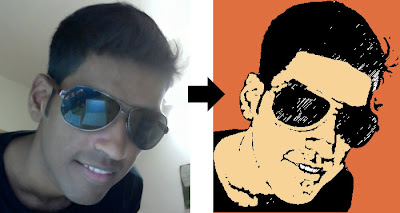
To create a cartoon effect for your photo follow the steps in this tutorial. Here is what we are about to do:

Step 1
Open your image in Photoshop! Goto Filter -> Artistic -> Poster Edges.


Step 2
Select the magic wand tool  and eliminate the background. You may need the lasso tool  in case the background is complicated.


Step 3
Now you need the magic wand   again to eliminate the face colors and details.

Step 4
After that Goto Filter ->; Sketch ->; Graphic Pen.


Step 5
Next you need to select the Lasso tool and eliminate the dots and details that appear. 

Finally it should look like this.


Step 6
Apply color #ef6536 to the background. Apply color #fbd954 to the face and skin. Your final image is ready.


Read more >>

C++ Game Programming Tutorial


If you are interested in programming games using C++ and do not know where to begin, this is the article for you! Here I have provided a tutorial to teach the basics of game programming using the Allegro Library in C++. If you not already know, Allegro is a external library for C++ that allows functionalities to code games with graphics and user interface.

Before you begin:
  • You must have some basic knowledge of C++
  • You must have Allegro Game Programming Library installed and working with the C++ compiler of your choice. For information on this refer to: Install Allegro

This tutorial is a comprehensive powerpoint presentation. It comes with a demo game and its code.

In the tutorial:
  • You will learn about the very basics of game programming.
  • In the process of this interactive learning you will also write a very simple game to gain some hands-on experience.
  • You will learn the syntax and the purpose of the common in-built functions provided by the Allegro Game Library.

You can download the tutorial here:

This tutorial was prepared by me for absolute beginners. If you have any doubts or find any errors do let me know. Any comments are appreciated!
Read more >>

This is Amulya Khare's blog cum website. You can know more about him by viewing his profile.

Read about his views and ideas on topics that grab his attention.

Also you can view his work and projects.

Included here are some resources and articles that you might find interesting or helpful.