Showing posts with label Resources. Show all posts

Cartoon Your Face in Photoshop - Tutorial

To create a cartoon effect for your photo follow the steps in this tutorial. Here is what we are about to do:


Step 1
Open your image in Photoshop! Goto Filter -> Artistic -> Poster Edges.


Step 2
Select the magic wand tool  and eliminate the background. You may need the lasso tool  in case the background is complicated.


Step 3
Now you need the magic wand   again to eliminate the face colors and details.

Step 4
After that Goto Filter ->; Sketch ->; Graphic Pen.


Step 5
Next you need to select the Lasso tool and eliminate the dots and details that appear. 

Finally it should look like this.


Step 6
Apply color #ef6536 to the background. Apply color #fbd954 to the face and skin. Your final image is ready.


Read more >>

Simple File Upload in C# .Net


Here are a few simple steps you can follow to upload files in C# ASP.Net using the File Upload Control in Visual Studio:
Step 1:
* Create the file upload control in the design view. The ID of my control is "File1".

Step 2:
*Here is the code to upload a file.


protected  string   uploadFile(string userid, string oldFileLocation)
{
    if (File1.PostedFile != null && File1.PostedFile.ContentLength>0)
    {
        string fn = System.IO.Path.GetFileName(File1.PostedFile.FileName);
        string SaveLocation = Server.MapPath("Folder") + "\\" + userid + "_" + fn;
 
        if (!fn.EndsWith(".doc") && !fn.EndsWith(".pdf") && !fn.EndsWith(".docx"))
        {
            return "Invalid File Type!";
        }
 
        if (!string.IsNullOrEmpty(oldFileLocation))
        {
            System.IO.File.Delete(oldFileLocation);
        }
 
        File1.PostedFile.SaveAs(SaveLocation);
        return "File Uploaded!";
    }
}


Note:
*I have used "userid" to ensure that uploaded files have unique names.
*I have created a folder "Folder" to save files into.
*I have added a check for the format of the uploaded file. You can vary the valid file type.
*I have also done a check to delete the existing file for that user.
Read more >>

Blosics 2 = Timepass :D

I came across this very interesting physics game! Great for timepass :D Enjoy it right here..


Or

Read more >>

C++ Game Programming Tutorial


If you are interested in programming games using C++ and do not know where to begin, this is the article for you! Here I have provided a tutorial to teach the basics of game programming using the Allegro Library in C++. If you not already know, Allegro is a external library for C++ that allows functionalities to code games with graphics and user interface.

Before you begin:
  • You must have some basic knowledge of C++
  • You must have Allegro Game Programming Library installed and working with the C++ compiler of your choice. For information on this refer to: Install Allegro

This tutorial is a comprehensive powerpoint presentation. It comes with a demo game and its code.

In the tutorial:
  • You will learn about the very basics of game programming.
  • In the process of this interactive learning you will also write a very simple game to gain some hands-on experience.
  • You will learn the syntax and the purpose of the common in-built functions provided by the Allegro Game Library.

You can download the tutorial here:

This tutorial was prepared by me for absolute beginners. If you have any doubts or find any errors do let me know. Any comments are appreciated!
Read more >>

Reverse Engineering (RCE): For Beginners

Reverse engineering is a critical set of techniques and tools for understanding what software is really all about. Formally, it is “the process of analyzing a subject system to identify the system’s components and their interrelationships and to create representations of the system in another form or at a higher level of abstraction” (IEEE 1990). This allows us to visualize the software’s structure, its ways of operation, and the features that drive its behaviour, even when the source code and documentation for the software are unavailable. It also equips us with the ability to modify software applications according to our needs.

Learning software reverse engineering requires a combination of skills and a thorough understanding of computers and software development, but like most worthwhile subjects, the only real prerequisite is a strong curiosity and desire to learn. Software reverse engineering integrates several arts: code breaking, puzzle solving, programming, and logical analysis.


While on one hand reverse engineering is used by software analysts to find flaws and faults in a software, to develop a strong protection scheme for the software and to improve the original code, it is also used (and I suppose more often) by hackers and crackers to modify an application to overcome its protection schemes, inject malicious features into an application and enable-disable restricted features. Reverse engineering, as Elliot Chikofsky describes in his foreword to the book “Reversing: Secrets of Reverse Engineering”, is like a stethoscope, which could not only be used by a doctor to detect breathing or heart problems but also by a burglar to listen to the lock mechanism of a safe as the tumblers fall in place. It is a tool which is not inherently good or bad but the issue is the use to which it is put.

While legal issues surround the usage and application of reverse engineering, acquiring knowledge about the techniques of reverse engineering is perfectly legal. As a beginner, you can learn how to create patches for a software in order to bypass restrictions. You can learn the internal working of a protection scheme to be able to find a password/ serial key for it or (even more) to be able to write a keygen for it. More advanced techniques may also teach you how to inject your own code into a piece of software. It is important for good guys to know these techniques too, as it provides one with a perspective of a hacker. To be able to think like hackers motivates one to develop stronger protection schemes and take anti-reversing measures for your software.

On a more personal note, learning reverse engineering is fun. You suddenly find yourself in a world of endless possibilities. There are several websites offering legal “crackme” files. It can be challenging, mentally satisfying and often addicting, when cracking these files. You force your mind to work analytically as never before. You can take your first step in being someone different from those you see all around you.

I wrote this article a few months back to help people (beginners) understand what reverse code enginerring is all about. I myself am a beginner in this field and hopefully someday I could advance to the next level. For now I
already have enough stuff at hand !!


Read more >>

Blogger Template- Working with CSS

I recently found time to expand my knowledge on web-designing by exploring in detail CSS-Cascading Style Sheets. For those of you who hear it for the first time, my friend wikipedia describes it: "Cascading Style Sheets (CSS) is a style sheet language used to describe the presentation (that is, the look and formatting) of a document written in a markup language. Its most common application is to style web pages written in HTML and XHTML, but the language can be applied to any kind of XML document, including SVG and XUL."

I had the idea of its syntax and working but never did i actually put my skills to practise. So I decided to start with something simple but something that would be useful and not a waste of time. Thus, I decided to create a blogger template.

Designing a blogger template from scratch would have taken ages.. so i decided to start with a pre-designed template and modify it with my styles and classes to give it the look i wanted. What came up as a result was this template:


This template incorporates shades of black, white and blue.. includes a favicon like the one for this blog, a navigation bar and several other customizable features. To be honest i think the blog banner is a bit too simple and can be futher improved. Since I don't have enough time now.. maybe I will update it in future.

You can download this template and use it for your own blog. Just visit the demo blog above and find out the details. Feel free to give your suggestions!
Read more >>

Gmail: Redefining Email

Coming 1st April marks the 5th anniversary of Gmail. Here is a blog post dedicated to the best web-based email service on the internet. Launched in 2004 as an invite-only service, gmail has come a long way. Today, anyone can have a gmail account and use its over 7GB and increasing free storage space. With the great flexibility offered by gmail, it is becoming the choice of the next-generation. If I begin to describe all the advantages of gmail over its competitors, from its 20MB attachment size to 99.9% accurate spam filter, it would probably be an endless post. In order to keep it concise, I will describe in brief some of the less popular yet extremely useful gmail features that make it stand out among its contemporaries.

Filters and labels are the backbone of how Gmail works (and by far its biggest strength), yet every Gmail user does not use them or does not know how to use them. One of the online articles about gmail describes “Not using the filters and labels in gmail is like going to visit a hooker and only asking for a hug.” So if you want more with your gmail account here is some useful information.

Labels: Gmail allows the feature of labels as a substitute to folders as used by other webmail services. We have become so used to having folders in our computers to organize our files and documents that at first, the concept of labels might not appear as good. But, once you begin to use it, the flexibility it provides is nowhere close to what folders offer. While one email can only be placed in one folder, it can have more than one label. So, an important email from a friend can be found when you look for it under the label “Friend” and under the label “Important”. Also folders require emails from your inbox, sent mails or archives to be moved under it, while labels give you the choice whether to move it or not. So the email can be in your inbox, sent mail or archives and yet be found under that label.
To learn more: Click Here

Filters: Gmail filters allow you to manage incoming mails. Using filters, you can automatically label, archive, delete, star, or forward your mail, even keep it out of Spam -- all based on a combination of keywords, sender, recipients, and more. If you receive junk mails from some website or some contact and you want to auto-delete them you can do it be just creating a filter. Next email from that contact will follow that action. I have a filter created that labels all my incoming notifications from facebook. This keeps my inbox clean and organized.
To learn more: Click Here


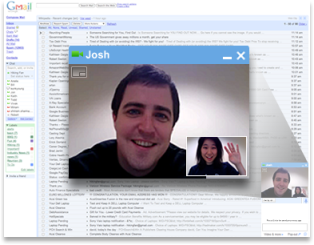
Video and audio chat: Although a well know feature, it definitely separates gmail from most of the popular email services. Now you can have an audio and video conversation with anyone who is online. So if you are a gmail user you do not have to log on to some alternative chat messenger to find a friend online and chat with him. You can do it right away from your gmail window.


Multiple accounts: Although, I am the kind of person who rarely uses my alternative email accounts, but for those who do have multiple email accounts in yahoo, hotmail etc can use their gmail account to check mails on those accounts. The official gmail blog states “Mail Fetcher lets you retrieve messages from up to five different email accounts. Besides taking advantage of Gmail’s spam filtering, you can also use Gmail to send messages using your other email addresses. This is convenient for users juggling multiple accounts -- log in once from anywhere and access all of your messages from different email accounts (without missing a single Gmail chat)."
To learn more: Click Here

Offline Gmail: Only a few days ago, my internet connection was down and I had to get an urgent print out of a document mailed to me by a friend. I didn’t know what to do. There was no way I could access my gmail. Finally I went to a cyber cafe and got the pages printed. The offline gmail feature allows your gmail account to be opened even if you are not connected to the internet. Not only it solves the problem above but it allows much more flexibility. Now you can retrieve, compose and send emails even if you are on a flight or in the outskirts with no internet connection. This is currently an experimental feature but considering its utility in this modern scenario, may soon be permanently implemented.
To learn more: Click Here


Search: There is a saying “There are some things man is not meant to know, for everything else there is Google.” Gmail integrates in it search the capability of the most powerful search engine—Google. You may not have realized it, but whenever you search a mail using search in gmail it performs the most thorough search, checking for the keyword right from the subject till the last letter of every email in your account. Not only emails, it looks for chats, voicemails and if you desire in spam and trash as well.
To learn more:
Click Here


By conversation: This is a less credited but extremely useful feature. The gmail help describes it: “Gmail groups all replies with their original message, creating a single conversation or thread. In other email systems, responses appear as separate messages in your inbox, forcing you to wade through all your mail to follow the conversation. In Gmail, replies to replies (and replies to those replies) are displayed in one place, in order, making it easier to understand the context of a message -- or to follow the conversation. When you open one message in a conversation, all of your related messages will be stacked neatly on top of each other, like a deck of cards. We call this Conversation View. In Conversation View, each new message is stacked on top of the ones that arrived before it, so that the newest message is always the one you see first.”

Gmail labs: It allows the gmail user to try out new feature that improve the gmail experience. The official gmail blog states: “Gmail Labs is a way for us to take lots of the ideas we wouldn't normally pick and let you all (who use Gmail) decide whether they're good or not. It has a list of experimental new features, and you can enable or disable each one. Some of the popular ones will become core parts of the product, and we'll eventually retire the ones that don't get much use.” Now you can enable features like undo send, keyboard shortcuts, tasks, forgotten attachment detector etc.

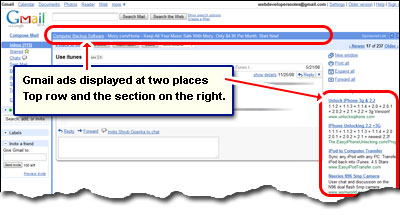
Ads: Email services are free and so they earn revenues by third-party advertisements. Gmail too is free and includes ads. However, unlike any other webmail services gmail ads are clean. All ads are in the right slide. No pop up, no ads on the top, no big flash movies as Ads. Only text based ads, and sometimes they are helpful too.


Along with these, gmail also offers a strong integration between itself and other Google services like Orkut, Calendar, Google docs, Picasa and many more. The creative gmail themes visually improve your gmail experience. This fast and ever-improving service is no-doubt redefining email. Visit the
official gmail blog for latest information and updates.
Read more >>

EA Sports Cricket

If you enjoy cricket and play computer games, EA sports Cricket is the one game you must have played before. There is no better graphics PC cricket game than the latest version from the EA sports cricket series. However, soon you find out that the quality of game is nowhere close to its contemporaries like FIFA or NHL. Player names for most teams are misspelt. Hence even if “S.Tendelki” scores a hundred, you do not feel the same joy. You miss the real excitement as the teams lack key players who recently entered the squad. The match winning partnership between “Dhoni” and “Yuvraj” is not as electrifying, when they look like some road-side “pan-walas”. And worst of all comes when you have played the game for a few weeks. You realize, you can hit sixes every ball, take wickets by bowling at the batman’s leg, and win almost every match you play. Finally you conclude that the game is nothing but boring. However, your deep-rooted interest in computer games and cricket, forces you to wait patiently for the next version of the game to be released, in hope that this time the game would be free from such flaws. But, I can assure you that with the little budget allotted to the EA Sports Cricket development team it shall not be possible in the near future.

However, do not be disappointed! Just take a look at the few screenshots below:


Do not be confused, this is EA sports cricket 2007 but not the original version. This is the self modified version of the game. The team rosters are updated, players have almost similar faces, new jerseys for all teams, there is IPL, and most importantly there is something that you do not see in the screenshots. There is an improved gameplay with which, shots can be played 360 degrees on the ground.

The next question that would be popping in your mind (of course, if you give a damn about all this) would be how is it done? The answer is: It just takes patience, enthusiasm, passion and an internet connection. If you have all this just follow the link below:


Here are a few things you must learn about to enjoy the game to the core:

  • Player Editor: Player Editor07 allows you to edit fully all the player names, abilities, stats etc. It is easy to use and has import/export features to allow you to share players and teams.
  • Gameplay Patch: Improve the quality of play with patches for features like IPL, or 360’ shot play, better AI, etc.
  • Stroke Editor: Allows variation of height and power and direction of strokes

You may also choose to learn about ways to have extra fun with the game:

  • Face Making: Create faces of cricketers and watch them play. You can create your own face.
  • Kit Making: Learn how to make custom kits for the teams, launch your own kit or improve on the existing ones.
  • Bat Making: Create your own bat, with customized features like your name or signature.
  • Stadium Graphics: Create stadium banners for a more realistic look or just make whatever banner you want to be displayed on the field.

Above all, you can download pre-made faces, bats, stadiums, kits etc. to use it with your game. Have fun:)

Read more >>

Agent based navigation in a 3D maze

This research project is a combined work of Amulya Khare and Rajul Gupta under the supervision of Asst/P Low Yoke Hean, Malcolm (School of Computer Engineering, Nanyang Technological University). This project was a submission for the Nanyang Research Programme and won a merit award. in the year 2007

Introduction
Civil-military operations such as Search and Rescue (SAR) operations require the rescue team to navigate through unknown terrains and environment. Such operations are aimed at finding people who are lost or injured in urban or remote areas which might be difficult to access. In many cases it may not be feasible to use human rescuers due to the hazardous nature of the environment (e.g. presence of bio-chemical materials or bombs). So such operations require the use of human as well as software controlled robotic agents which may efficiently carry out the required task without much risk to human lives. In operations where large numbers of robots are deployed, these robots have to be controlled by software agents and use different strategies for path-planning to complete the SAR operation quickly and effectively. Such tactics include implementation of different kinds of searches by different robots and co-ordination between them to achieve a common goal. The testing of the efficiency of such robots in different terrains, if done in real world environment, may result in the damage of the robots and may also require resources for the creation of such the test environment. Thus a 3D simulation environment of the terrain can be created to provide a realistic testbed for these software controlled robots. Such an environment is inexpensive and easy to create and provide a fast way to obtain test results. Our project aims at creating a 3D maze as a testbed to demonstrate the efficiency of the different tactics used by these robots in a search and rescue operation of an unknown terrain.

Project Overview
We have used Unreal Tournament (UT), which is a commercial-off-the-shelf (COTS) game system, as a platform to create our 3D maze. UT game engine provides comprehensive tools for the creation of the maze along with advanced visualizations for realistic game play. The UT bots in the maze introduced by JBOT client will be controlled by a Java program that would define its path for the SAR operation in the maze. Three UT bots will be performing three different kinds of searches (Depth-first-search, Breadth-first-search and A*(Star) search) in the same maze simultaneously. The efficiency of these algorithms depends on the map of the terrain and the destination location. By using different maps, the efficiency of the algorithms in different SAR operations can be evaluated.

Project Poster


Click to Enlarge

Research paper
You can view our research paper:
CLICK HERE
Screen shots


Read more >>

The First Click

The idea of game programming struck me when I was talking to a friend about doing something during the holidays. I began researching about programming games using C++. I chose C++ because I was very familiar with most (if not all) aspects of this language. During my research I came across this word “Allegro” a number of times. My next step, as any amateur researcher, was to check for “Allegro” on Wikipedia and what came up was:

http//en.wikipedia.org/wiki/Allegro_library

“Allegro is a free and open source software library for video game development.

The functionality of the library includes support for basic 2D graphics, image manipulation, text output, audio output, midi music, input and timers, as well as additional routines for fixed-point and floating-point matrix arithmetic, Unicode strings, file system access, file manipulation, data files, and (limited, software-only) 3D graphics.”

This description was good enough for me to look for some online site that describes how to download and install allegro to work with my Microsoft Visual C++ Express Edition 2005.

Deviating from the topic let me first talk a bit about Microsoft Visual C++ for those who are hearing it for the first time.

“Microsoft Visual C++ (often abbreviated as MSVC) is a commercial integrated development environment (IDE) product engineered by Microsoft for the C, C++, and C++/CLI programming languages. It has tools for developing and debugging C++ code. The idea of express editions, according to Microsoft, is to provide streamlined, easy-to-use and easy-to-learn IDEs for less serious users, such as hobbyists and students.”

In simple terms, it just provides a platform for you to write your codes, compile them and create executables. Other C++ IDE is DEV C++ which is preferred by other programmers. However I will stick to explaining MSVC since I like its interface, formatting and appearance.

Coming back to Allegro,

After a Google search I found these websites dedicated to Allegro Library.

· http//www.talula.demon.co.uk/allegro/readme.html . This might be helpful to understand more about Allegro and download latest versions and tutorials.

· http//wiki.allegro.cc/. This site contains most information you would need with extensive resources and hyperlinks.

· http//www.allegro.cc/ . This is a forum, which will be really helpful for troubleshooting and learning new stuff.

After going through the various sites I finally found this page which was dedicated to configuring allegro with MSVC 2005.

http//wiki.allegro.cc/index.php?title=Visual_C%2B%2B_Express_2005

I followed the links provided to download the compatible version of allegro and followed the instructions to install it. After some initial troubles with the configuration settings I managed to get allegro working however with a slightly different configuration setting than what was listed:

  1. Select Project / Properties....
  2. Under Configuration Properties / C/C++ / General, change Debug Information Format to Program Database for Edit & Continue (/ZI).
  3. Under Configuration Properties / C/C++ / Optimization, change Optimization to Disabled.
  4. Under Configuration Properties / C/C++ / Code Generation, change Runtime Library to Multi-threaded Debug DLL (/MDd).
  5. Under Configuration Properties / Linker / Input, add alleg.lib to Additional Dependencies.
  6. Under Configuration Properties / Linker / Debugging, change Generate Debug Info to Yes (/DEBUG).
  7. Press OK.

I added alleg.lib to the additional dependencies instead of alld.lib

Then it was time to start learning allegro programming.

The first and most useful tutorial that I used was C++ Game programming at http//www.cppgameprogramming.com/

It covered almost everything that I needed. Then to take a look at the advanced allegro features I directly jumped to the Allegro Manual and documentation which is so well-written that I didn’t require any further tutorials. With this I was on my way with game programming.

Read more >>

This is Amulya Khare's blog cum website. You can know more about him by viewing his profile.

Read about his views and ideas on topics that grab his attention.

Also you can view his work and projects.

Included here are some resources and articles that you might find interesting or helpful.